
Download Youtube Driver – YouTube Video Downloader, Offline Viewing, Internet Explorer Add-on
Overview
Youtube Driver is a specialized tool designed to enhance the video downloading experience within Internet Explorer. Its primary purpose is to allow users to save YouTube videos directly to their local devices for offline access. This functionality addresses the common need for users to retain access to content without relying on a continuous internet connection, particularly useful during travel, in low-connectivity areas, or when data usage must be minimized. The app is specifically tailored for individuals who frequently consume YouTube content and require a straightforward method to archive or revisit videos.
Target users include YouTube enthusiasts, educators who rely on video materials, and anyone seeking a reliable way to download content for personal use. While the developer did not provide additional background information, the app’s focus on Internet Explorer suggests a niche audience seeking browser-specific solutions. Real-world applications include saving tutorial videos, educational lectures, or entertainment content for later viewing. In the broader app ecosystem, Youtube Driver fills a gap left by mainstream browsers that do not natively support video downloads, offering a dedicated utility for a specific platform.
Although the developer did not list formal performance metrics, the app’s functionality appears optimized for its intended environment. Its longevity since release in 2007 indicates consistent user demand and stable operation within its designated browser. The app’s continued relevance underscores its utility in a niche but persistent digital need.
Key Features & Functionality
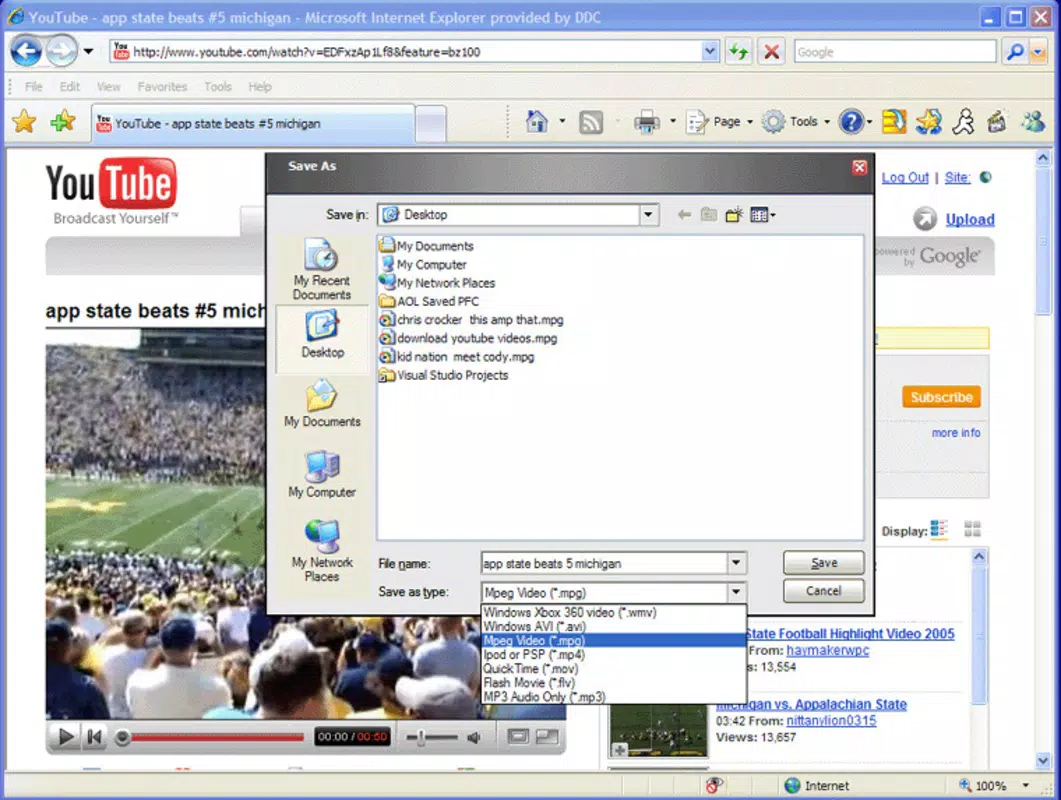
- Simple Downloading: A dedicated button appears next to the address bar in Internet Explorer, enabling users to initiate video downloads with a single click. This streamlined process eliminates complex navigation or manual URL copying.
- Format and Quality Options: Users can select preferred video formats and resolutions, ensuring compatibility with various devices and storage preferences. This customization allows for optimized file size and playback performance.
- Offline Enjoyment: Once downloaded, videos can be played without an internet connection, supporting uninterrupted viewing in environments with limited or no connectivity.
- User-Friendly Interface: The design prioritizes accessibility, making the app suitable for users with minimal technical expertise. The interface integrates seamlessly into the browser’s existing layout.
- Browser-Specific Optimization: Built exclusively for Internet Explorer, the add-on ensures compatibility and stability within its target environment, avoiding conflicts common in cross-browser tools.
For example, a student could download a series of lecture videos before a flight, selecting high-quality MP4 files to ensure clarity. Similarly, a content creator might save reference videos for offline review. These use cases highlight how the app’s features translate into tangible benefits for real users.
Interface, UX & Performance
The interface of Youtube Driver is designed with simplicity and integration in mind. It adds a minimal button to the Internet Explorer address bar, maintaining a clean and unobtrusive appearance. The visual style aligns with the browser’s native design language, avoiding disruptive elements that could distract from the browsing experience.
Navigating the app is intuitive. After clicking the download button, users are presented with a straightforward selection menu for format and quality. The process is linear and predictable, reducing user error. This ease of use is especially beneficial for non-technical users who may struggle with more complex download tools.
Although the developer did not list formal performance metrics, the app’s long-standing presence suggests reliable operation. It functions within the constraints of Internet Explorer, which may vary in responsiveness across different hardware configurations. The app does not appear to impose significant system resource demands, allowing it to run smoothly on older or low-spec devices. Stability is maintained through focused development for a single browser environment.
Platform Compatibility & Technical Requirements
Youtube Driver is designed exclusively for Internet Explorer, indicating compatibility with Windows-based systems. The specific operating system version was not listed by the developer. Similarly, no details were provided regarding the minimum OS requirements or file size of the add-on.
Given its release date of November 23, 2007, the app was developed during a time when Internet Explorer was the dominant web browser. As such, it may not support modern Windows versions or newer security protocols. Users should be aware that Internet Explorer is no longer supported by Microsoft as of June 2022, which may affect the app’s functionality and security on current systems.
Pros and Cons
Pros
- Simple one-click download process from YouTube within Internet Explorer
- Offers flexibility in selecting video format and quality
- Enables offline viewing without internet dependency
- Designed for ease of use, suitable for non-technical users
- Integrated directly into the browser interface for seamless access
Cons
- Exclusive to Internet Explorer, limiting use on modern browsers
- Not compatible with current Windows versions due to IE’s deprecation
- Developer did not provide updated technical specifications or file size
- Limited to a single browser, reducing versatility
- Security risks may arise from using outdated software
FAQ
Is Youtube Driver safe to use?
The app’s safety depends on the source of the download and the system’s current security environment. As Internet Explorer is no longer supported, using any add-on with it may expose the system to vulnerabilities. Users should only install the app from trusted sources.
Can I use Youtube Driver on modern browsers like Chrome or Firefox?
No, Youtube Driver is specifically designed for Internet Explorer and is not compatible with other browsers. Users seeking similar functionality should explore alternatives available for modern platforms.
Does Youtube Driver support the latest YouTube video formats?
Given its release in 2007 and reliance on Internet Explorer, the app may not support current YouTube video encoding standards or features. Compatibility with modern videos cannot be guaranteed.
How do I install Youtube Driver?
Installation typically involves downloading the add-on from a trusted source and following the browser-specific setup instructions. However, the developer did not provide detailed installation steps.
Is Youtube Driver free to download and use?
While the developer did not specify pricing, the app is generally available as a free tool. Users should verify the source to ensure no hidden costs or bundled software are included.
Final Thoughts
Youtube Driver represents a niche solution for a specific digital need—downloading YouTube videos within Internet Explorer. Its straightforward interface and focused functionality made it a valuable tool in its time. However, its reliance on a deprecated browser significantly limits its relevance today. While it may still function on older systems, users are strongly advised to consider modern alternatives for safer, more compatible video downloading experiences.
For those still using Internet Explorer for legacy purposes, the app offers a functional, if outdated, method to save videos. But for the majority of users, the risks and limitations outweigh the benefits. The app’s historical significance is clear, but its practical value in 2024 is minimal.
Download Youtube Driver now


